

We are seeing a fundamental shift in how teams work. Engineering figured it out first, using AI to create leverage and compound productivity. AI is giving IT teams that same leverage with the ability to move from reactively responding to tickets to proactively building tools and automating work. Remember when IT gave everyone in the office wifi? We’re back.

We solved the Tier 1 problem first. But IT work doesn't stop there.
Tier 2 is more complex: building new Playbooks, investigating and resolving multi-system issues, figuring out what to automate next, handling requests that don't fit an existing workflow. Console Assistant lets you tackle all of it.
We built Assistant directly into the Console workspace: a natural language AI-agent designed specifically for Tier 2 work. With your company's full context as its foundation, you can use Assistant to build new automations, find out what you should build based on actual request data, and delegate complex or ad-hoc requests in plain English. Every category of Tier 2 work your team faces, Assistant is built to handle. Additionally, if there’s an API for it, Assistant can build connectors in real-time to automate it.
Assistant in the Hands of Customers
Since we quietly added Assistant to customer workspaces in mid-February, more than 95% of our customers have discovered and started using it. Some are using it hundreds of times a week.
They're delegating everything from building new Playbooks to creating user groups to investigating resolution gaps to handling complex requests that used to require engineers. We’ve collected a series of top Assistant use-cases that we’ve seen across our customers.
This is what Tier 2 work looks like when your team has Assistant.
Use Case 1: Build connectors in real-time
Legacy applications require pre-built integrations, or engineering talent that knows how to connect to specific APIs. Workflows get blocked for months or deprioritized entirely.
With Console, you tell it what you want to integrate and what you want to automate. It finds the API docs, understands how the system works, and builds its own connectors on the fly. If the application has an API, Console can automate it.
Here's an example. An IT team wants visibility into devices that haven't checked in with the MDM. They ask Console to pull a report. Console thinks through the approach, realizes there's no Fleet DM connector, and goes to work: it researches the Fleet DM API, builds and verifies a "List Fleet Hosts" action, and surfaces a report showing 87 stale devices categorized by assignment status, with a breakdown of the oldest offenders and a pattern analysis.
That's part one. In part two, the team asks Console to do something about it. Console looks up each employee's office location and sends personalized Slack messages: in-office employees get the option to drop off at the IT desk or request a shipping label, remote employees get the label-only option. Then Console offers to set up the follow-on automations, handling replies, generating labels, sending reminders, so the team never has to touch it again.
A connector that didn't exist. A report that would have taken hours to build. A device retrieval campaign that would have taken days to coordinate. All of it was handled in under 5 minutes, in one Assistant conversation.
Use Case 2: Self-learning automation loops
Console’s Inbox auto-routes and auto-enriches every request that requires a human. Each one lands in your Inbox with all of the information you need to resolve the issue fast. But one of the best parts is the ability to use the steps you take to fix the problem as a direct input for building a new automation.
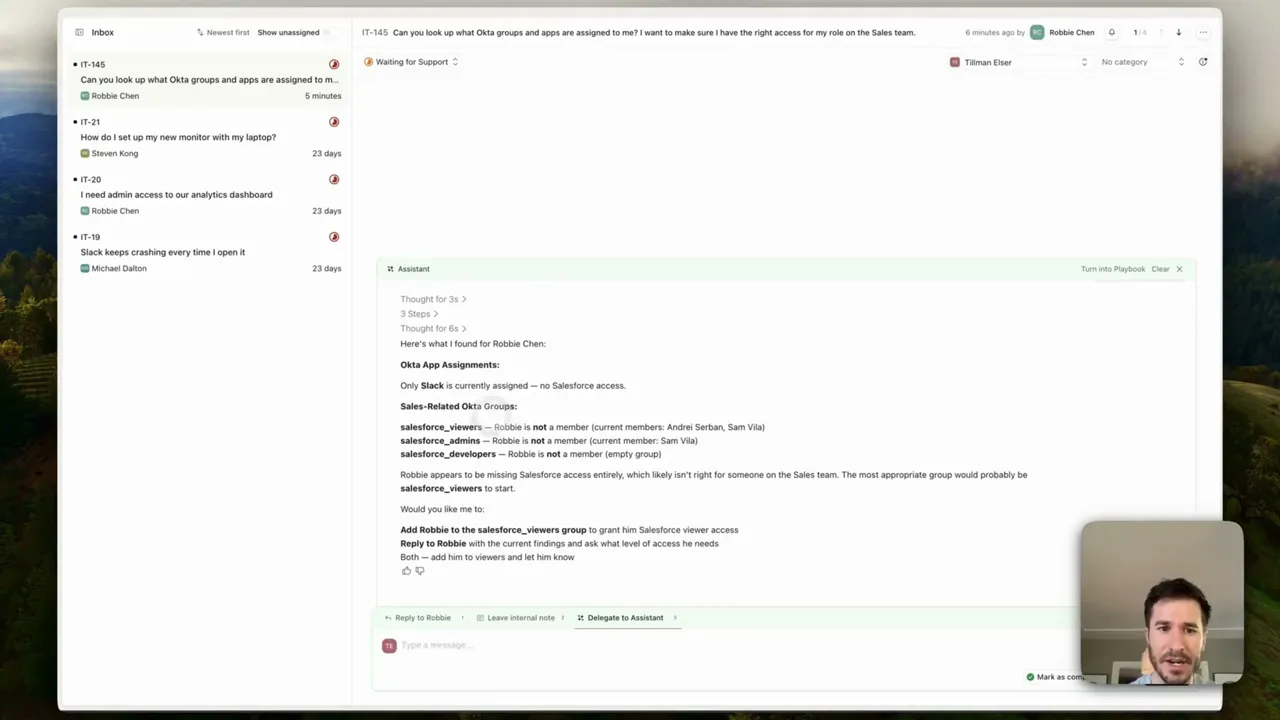
Take, for example, a user who’s trying to understand which Okta groups they’re in and what apps they have access to. They ask Console a question in Slack or Teams, and if there’s no existing automation, the request hits the correct IT admin’s Inbox.
Using Assistant directly within the Inbox interface, not only can the admin get the user added to the right groups, but they can turn the process they just used to resolve the issue into a Playbook that automates the entire process so it never becomes a Tier 2 issue again.
Watch as Tillman Elser, Lead AI Engineer at Console, handles a similar situation and uses Assistant to fill a critical automation gap.
Use Case 3: Build me a new Playbook
Tier 2 work requires judgment, context, and time. Building automations used to require technical knowledge: knowing exactly what you wanted, how to connect APIs, and how to configure the logic correctly. Console Assistant changes that. Describe your desired outcome in plain language and the agent builds a Playbook for you.
Here's an example. An IT or security team might lock AirDrop on all devices as a default security posture, while still allowing employees to request temporary access when they need it. Managing that on a per-request basis is wildly inefficient.
With Console Assistant and a Kandji integration, an IT admin just describes what they want. In minutes, Console builds a multi-step playbook with an approval gate that lets end-users request 15 minutes of AirDrop access with a single message in Slack or Teams.
Watch as our Head of Product, Fred Kang, builds the Airdrop access playbook with Assistant in under 5 minutes.
Use Case 4: Automation for the entire organization
Assistant is not just for IT-specific issues.
Imagine all of your contract data lives in tools like HubSpot or Salesforce. Finding it and updating it when you actually need to is tedious for your sales org. Building the automation to make it easier for them is exactly the kind of Tier 2 work that falls through the cracks.
Using Assistant, you ask in natural language: update the owner of a specific deal in Salesforce and then build a playbook so the Sales team can make changes like this on demand going forward.
Console Assistant updates the deal owner in Salesforce and builds the Playbook based on the same steps it just took and you publish it to your workspace. From that point forward, updating a deal owner in Salesforce takes a single message in Teams or Slack.
Use Case 5: Surface insights & show me what to build
Deciding what to build next is one of the most valuable forms of Tier 2 work, and one of the most neglected. IT teams are heads down. Stepping back to prioritize based on real metrics takes time nobody has.
A team asks Console to review the last month of support requests, cross-reference their current playbooks, and surface what they should build next. Console comes back with five recommendations that could cover an estimated 85 to 130 additional requests per month, with a meaningful reduction in their unmatched rate.
The team asks what the full impact would look like if they built all five. Console runs the numbers: auto-resolution would likely land somewhere around 90 to 95%, up from 82.6% today. The biggest gains come from the first two playbooks, which are also the easiest to build.
See how our Co-founder and CEO, Andrei Serban, surfaces real insights and uses Assistant to understand what he should build next along with the potential impact it can have.
Building for the Future of AI
If the last 12 months have taught us anything, it's that the next 12 months will look drastically different in terms of how we build with AI. The teams that will get the most out of it are the ones building on platforms that can reason, adapt, and improve as the models improve.
Assistant represents a future where AI continues to be the force multiplier. It not only auto-resolves Tier 1 issues but also helps you handle Tier 2 tasks that require deep thinking and organizational context in minutes instead of hours.
IT's time to build.
Interested in seeing Assistant in action? Get in touch →
Subscribe to the Console Blog
Get notified about new features, customer
updates, and more.
Related Articles
How AI Can Auto-Enrich IT Support Tickets
The majority of IT tickets contain a sentence or two describing the problem and nothing else. From the employee's perspective, that's...
Read More
Employee Workflows and IT Automation: How Modern IT Teams Run Internal Operations
The bulk of what IT handles day to day is access requests, device issues, account lockouts, and onboarding tasks. These requests don't...
Read More